

Oral Health Program website redesign
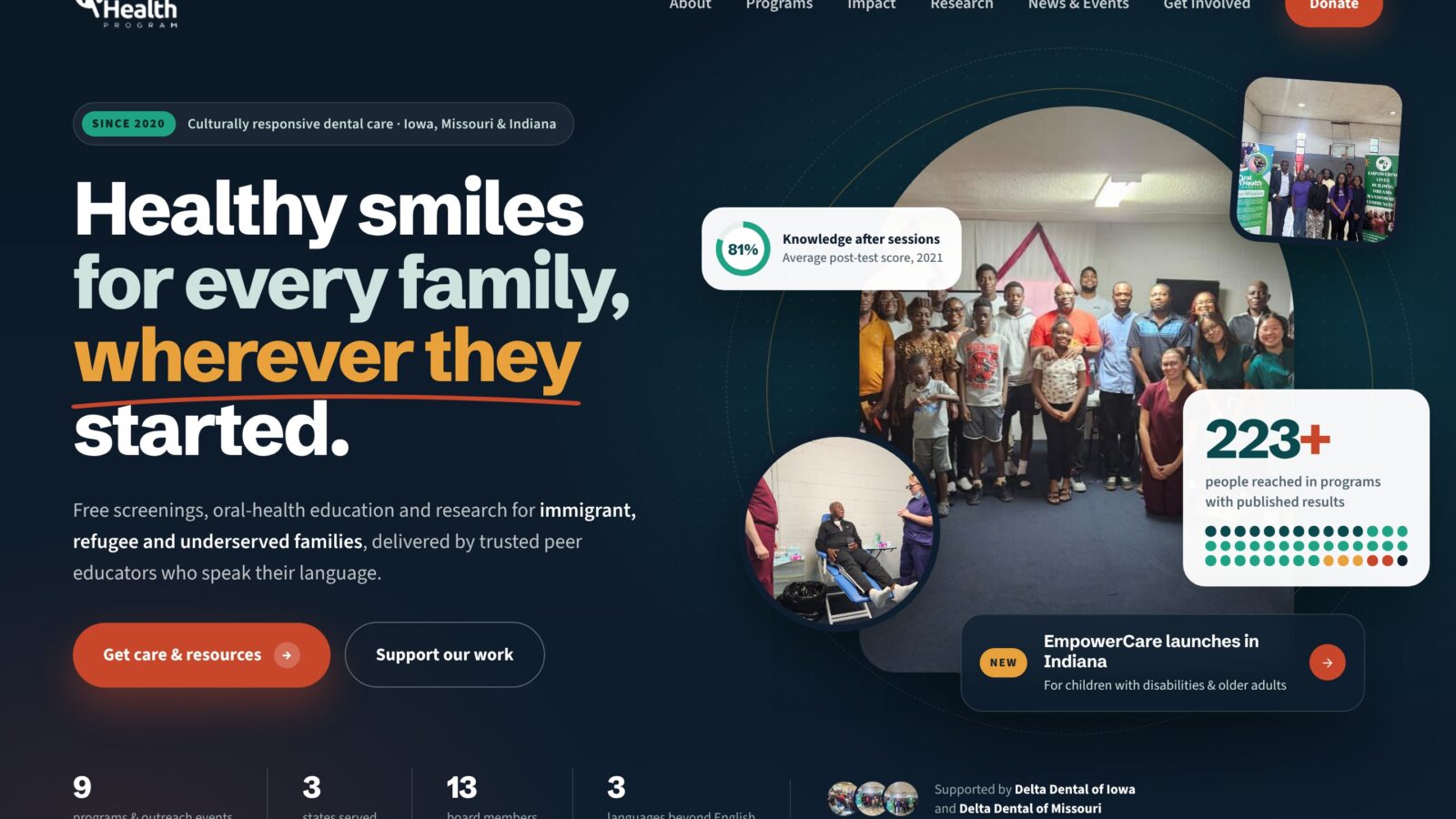
An audit and eight-page redesign for a US nonprofit bringing dental care to immigrant, refugee and underserved families, built on its own data and photos and delivered as native Elementor templates the team edits without code.
- Client
- Oral Health Program
- Sector
- Nonprofit, community oral health (United States)
- Role & scope
- Site audit, 5 homepage concepts, 8-page design system, WordPress build
- Status
- Delivered
Project overview
An audit and eight-page redesign for a US nonprofit bringing dental care to immigrant, refugee and underserved families, built on its own data and photos and delivered as native Elementor templates the team edits without code.
Technologies used
Client & context
The Oral Health Program started in Iowa City in 2020 with one project for immigrant families. It now runs programs across Iowa, Missouri and Indiana. Its model rests on trained community peer educators, who share oral-health knowledge in families' own languages and settings.
The organisation has a lot to show: nine programs and outreach events, Delta Dental funding, a 13-member board of clinicians and specialists, and a study in the Journal of Global Oral Health. The website is where funders, partners, volunteers and families meet that story first. For a small nonprofit, it is also the main place to raise money and recruit volunteers.
The problem
The old site undersold strong work. My audit found three problems that hurt credibility and fundraising most:
| Problem | What I found |
|---|---|
| Looked inactive | The newest blog post was from January 2025, the homepage still promoted a July 2024 outreach, and a finished project still read "Program Progress: Ongoing". |
| No calls to action | There was no Donate button, no volunteer or peer educator sign-up, no contact form, no newsletter and no route for partner enquiries. |
| Weak trust signals | Placeholder board avatars, broken images, typos and contradictory figures. |
Accessibility was a real issue too: images of text, missing or overlong alt text, and headings chosen for their look rather than their meaning. Many of the families it serves are refugees or have limited English, so clear structure and plain language matter more than usual. And any redesign had to stay easy for a small, non-technical team to update in WordPress, or it would go stale again.
Objectives
- Look like a world-class NGO. Mature, credible and modern, with nothing childish or generic.
- Prove impact with evidence. Put the organisation's real numbers, reports and published research up front.
- Give every visitor a clear next step. Donate, volunteer, become a peer educator, partner or sign up for events from any page.
- Show the real community. Replace stock-style imagery with the organisation's own outreach photos.
- Be accessible and readable. Use a sound heading structure, strong contrast and plain language, and work well on phones.
- Stay editable. Let the team change text, photos, programs and news in WordPress without code or cPanel.
Discovery & strategy
I started with a full audit of the live site covering content, navigation, trust signals, calls to action, accessibility and how current the content was. I then mapped every real asset the organisation had: program reports, survey results, board biographies, partner lists and the journal article. Those facts became the raw material for the design, so every number on the new site traces back to a source.
Rather than settle on a look too early, I explored five homepage concepts:
| Concept | Direction | Result |
|---|---|---|
| 1 | Clean redesign of the existing structure | A good baseline, but not distinctive |
| 2 to 4 | Bolder, more vibrant explorations | Rejected by the client: the colours felt too playful, "not for children" |
| 5 | Mature editorial layout, built from a reference layout the client chose | Approved and extended to all 8 pages |
The client's feedback set the brief: mature, very professional and still inspiring. Each page then got one job for one main audience. Impact and Research convince funders. Programs explains the model. Get Involved and Donate turn interest into action.
Design direction
The direction is calm authority with warmth, closer to a global health foundation than a charity flyer.
- Colour. A deep teal (#0A4A4F) anchors the brand and carries the big statement sections. Persimmon (#C8472B) is kept for action, such as Donate buttons, labels and links, so it always means "do something here". Saffron and emerald pick out highlights and positive figures; sand and mist soften the panels.
- Typography. Schibsted Grotesk for headings: confident and editorial, with tight letter-spacing at large sizes. Source Sans 3 for body text: highly readable at small sizes and on phones.
- Photography. All imagery is the organisation's own: outreach days, screenings, health talks and youth groups, each matched to the message of its section. Captions stay general, and the client confirmed consent for every photo.
- Layout system. A 1,240px grid, generous section spacing, rounded cards and a repeating section pattern (kicker label, headline, short intro, then content). Dark teal and ink bands break up long pages and mark the key moments.
User experience decisions
Data you can feel, not just read. Funders skim numbers, so I turned the key findings into small interactive visuals:
- Impact: "Every dot is a person we reached." 223 dots, one per person. Selecting a program lights up its people.
- Research: "If our survey were 100 people." Visitors pick a survey question and a grid of 100 people shows the answer. For example, 63 had never heard of Iowa's Dental Wellness Plan.
- Get Involved: the multiplier slider. It shows how each trained peer educator reaches about 34 neighbours, which makes the case for volunteering at a glance.
An action on every page. A persistent Donate button sits in the header, and every page ends in a call-to-action band. Get Involved opens with four clear doors (Give, Teach, Volunteer, Partner) so visitors find their role straight away.
Forms that feel short. The peer educator application is split into three steps (about you, your community, your availability), and asks about the languages people speak, which is what the program needs most.
Depth without clutter. All nine programs and all 13 board profiles sit in expanding panels. Honest evidence: every statistic names its source, and programs without published totals are named as not yet counted rather than given made-up numbers. Built for phones and low bandwidth: one column on mobile, large tap targets, compressed photos and real text instead of images of text.
Development & implementation
Phase 1: live HTML prototypes. I built all eight pages as working, responsive pages in HTML, CSS and JavaScript, so the client could click through the real experience and review real content rather than static mock-ups. During this phase I placed the 11 client photos across every page, swapped in the official logo and fixed details found in review.
Phase 2: WordPress with no code. The client's key requirement was to edit the site in WordPress without HTML or cPanel. Pasting the prototype code into the site would have locked the team out of their own content, so I rebuilt the design as native Elementor Pro templates:
- Native widgets for everything editable: headings, text, buttons, photos, counters, progress bars, accordions and icon boxes.
- Dynamic news. Blog post grids and search replaced hard-coded news cards, so new posts appear on Home and News & Events by themselves.
- Real forms. Elementor forms, including the three-step application, email the team and store every entry.
- Theme Builder header and footer, shared across the whole site with a real WordPress menu.
- Only three locked blocks. The three interactive data visuals stay as small, self-contained code blocks, because rebuilding them natively would have lost the interaction.
The result is 10 importable templates (a header, a footer and 8 pages), uploaded as a single zip from the WordPress dashboard, with a step-by-step import and editing guide. To keep scope realistic, the gift builder became plain donate buttons ready to link to a donation platform, and the role quiz and dark mode were left out of the WordPress version.
Outcomes
- A website audit and redesign plan.
- 5 homepage concepts and an approved 8-page design system.
- 8 fully designed, responsive pages using the organisation's 11 real photos.
- 10 Elementor templates (header, footer, 8 pages) imported in one upload.
- An import and everyday editing guide for the team.
None yet. These are the measures that will be reported after launch:
- Donations made through the site
- Volunteer and peer educator applications
- Time on page for Impact and Research
Lessons learned
- Show options early. The first concepts were rejected for feeling too playful. Getting that reaction before building all the pages saved weeks, and seeing several directions side by side helped the client say what "professional" meant to them.
- Real content beats placeholders. Designing with the organisation's own numbers, reports and photos made every section more convincing, and exposed gaps that we then handled honestly.
- A design is only as good as the team's ability to keep it current. Choosing native Elementor widgets over pasted code was a deliberate trade: a little less custom interaction for a site the team actually owns.
- Interactivity should serve the argument. The three data visuals stayed because each one makes a funder's case in seconds; features that didn't were the right ones to cut.
- Test at every screen size. Small issues, like one long word breaking a heading, only showed up at certain widths.
Planning something similar?
Tell me about your project and I will share how I would approach it.