

CS-SUNN website redesign
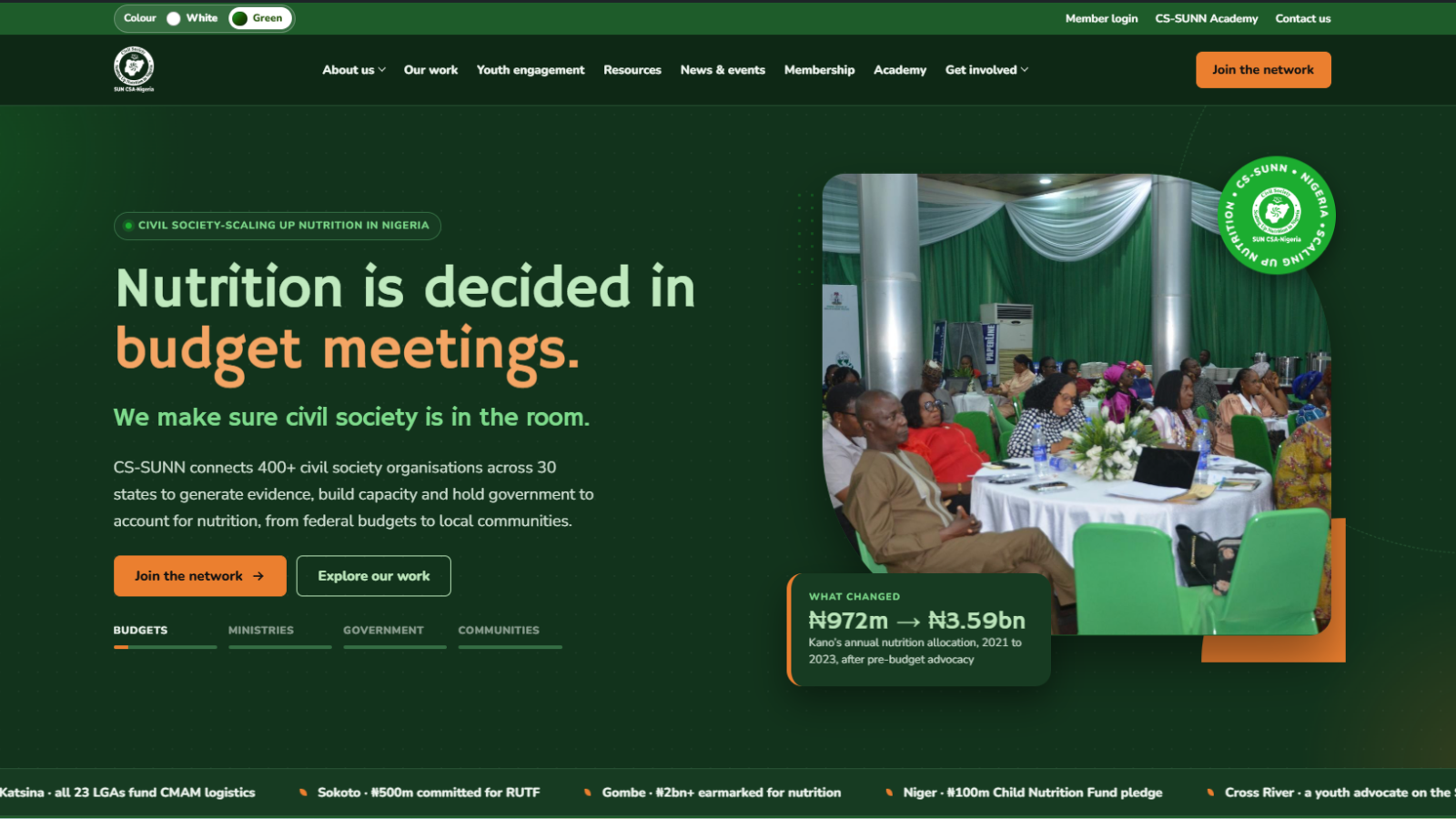
A results-first WordPress theme for Nigeria's national nutrition coalition: programmes, state chapters, reports and people are entered once in simple forms, and the pages lay themselves out.
- Client
- Civil Society-Scaling Up Nutrition in Nigeria (CS-SUNN)
- Sector
- Nonprofit, nutrition advocacy
- Role & scope
- Product owner, UX and visual design lead, build and testing (as CS-SUNN's ICT Manager)
- Status
- Built and tested, awaiting launch
- Year
- 2026
Project overview
A results-first WordPress theme for Nigeria's national nutrition coalition: programmes, state chapters, reports and people are entered once in simple forms, and the pages lay themselves out.
Technologies used
Client & context
CS-SUNN connects 400+ civil society organisations across 30 states to hold government to account for nutrition, from federal budgets to local communities. Over more than a decade it has run 12 major programmes with partners such as the Gates Foundation, UNICEF, Nutrition International and Irish Aid, and its PINNS 3.0 programme now extends the model to Kenya, Tanzania and Ethiopia.
The website has to work for very different readers at once: government and legislators looking for evidence and budget data, donors checking track record, member organisations and state chapters, young advocates, job seekers and suppliers, and media and researchers downloading reports.
A small Communications and ICT team runs the site on WordPress with Elementor. The redesign had to fit that team: everything stays editable in the WordPress dashboard, with no HTML and no file uploads through cPanel. The project ran in October 2026, about two weeks from first design to theme version 1.7.9, across 16 main pages, 12 programme pages, 29 state chapter pages, 3 country pages, a 30+ document resource library, careers, procurement and a staff IT helpdesk.
The problem
CS-SUNN had a strong story of results, but the website made visitors dig for it, and keeping it current depended on technical skills the team should not need.
- Impact was buried. Results such as Kano's nutrition allocation rising from ₦972m to ₦3.59bn sat inside long passages instead of leading the page.
- Project pages lost readers. They were mostly text, with the photos stacked at the bottom where few people scrolled.
- Reach was hard to picture. Nothing showed at a glance where the 29 state chapters and the international work were.
- Reports were hard to browse. Documents had no covers, filters or file sizes, which matters to readers on mobile data.
- Partners were a list of names, which undersold the coalition's backing.
- Updates depended on layout skills. Adding a project or a vacancy meant building page layouts by hand rather than filling in a form.
Objectives
- Lead with results. Open the homepage and every programme page with a concrete outcome and its figure.
- Make reach visible. Show the state chapters and international work on interactive maps.
- Enter content once, use it everywhere. A programme added in the dashboard should appear on Our work, its state pages, the homepage timeline and related pages without extra work.
- Keep editing code-free. Every page and section stays editable in Elementor, and brand colours come from shared global settings.
- Work on any device and connection. Mobile-first layouts, light pages and compressed downloads, with accessibility built in.
- Support the team behind the site. Add a private IT helpdesk so staff requests are tracked and reported.
Discovery & strategy
I started by auditing what CS-SUNN actually publishes, then designed the structure around that content rather than around page templates: 12 programmes, 29 state chapters, 3 technical assistance countries, 30+ reports and briefs, four governance and staff groups, vacancies and procurement notices.
| Audience | What they need first | Where the site answers |
|---|---|---|
| Donors and partners | Track record, results, reach | Homepage timeline and maps, Our work, programme pages |
| Government and legislators | Evidence and budget figures | Programme results, Resources |
| Member organisations | How to join and take part | Membership, state chapter pages, Academy |
| Young advocates | The youth network | Youth engagement |
| Job seekers and suppliers | Open opportunities | Careers, Procurement |
| Media and researchers | Reports and news | Resources, News and events |
- Structured content over free-form pages. Programmes, state chapters, countries, resources, people, vacancies and tenders became their own content types with form fields, so one entry feeds many pages.
- Design first, then build. I laid out the homepage and every page type on an interactive design canvas for review before any code was written.
- Stay on WordPress and Elementor. The team already edits there, so a custom theme built for Elementor kept their workflow while adding structure.
Design direction
The look is confident, warm and evidence-led: CS-SUNN's greens for trust, orange only for action, and real field photography throughout.
- Colour. Built from the CS-SUNN brand guide: deep green #1A4D00 for headings and structure, bright green #1CAD30 for highlights, mint #ECFFF2 for soft surfaces and orange #EB7F2F reserved for buttons and calls to action.
- Two colour modes. A White look and a dark Green look, chosen with a switch in the header and remembered. Both run on Elementor's global colour roles, so anything an editor builds changes with the switch.
- Typography. Hammersmith One for headings gives a bold, civic voice; Nunito for body text stays friendly and readable on small screens.
- Photography. Photos of CS-SUNN's own workshops, dialogues and community sessions, placed through each page rather than in a block at the end.
- Data as design. Figures are large and kept together (₦972m → ₦3.59bn never breaks across lines), count up as they appear, and sit beside the story they support.
User experience decisions
| Where | Decision | Why |
|---|---|---|
| Homepage hero | "Nutrition is decided in…" rotates through budget meetings, ministries, Government Houses and communities, each with a real result and photo | States the mission and proves it in the first five seconds |
| Flagship programmes | An interactive timeline of all 12 programmes by start year; hovering a card reveals funders, coverage and a link | Shows more than a decade of track record at a glance |
| Our reach | Nigeria's state chapter map and the Africa map side by side, both clickable | Makes national and international reach visible without reading |
| Programme pages | Photos throughout, a sticky "On this page" bar, figures that count up, a photo gallery and a reading progress bar | Keeps readers moving through long pages |
| Resource library | Cover thumbnails, type filters, search, sorting and the file size on every download button | Readers know what they will get before spending mobile data |
| Careers and procurement | Notices switch from Open to Closed on their closing date | Nothing stale stays on the site |
| Phones | Timelines turn vertical and hover details are shown on the card | Touch users see everything desktop users see |
Every interactive element works with the keyboard and has a visible focus state, motion stops for visitors who ask their device to reduce it, and icons and charts carry text labels for screen readers.
Development & implementation
I built a custom WordPress theme for Elementor, plus a separate helpdesk plugin, and shipped them in small tested versions up to theme 1.7.9.
- Theme architecture. 15 custom Elementor widgets (animated hero, key figures, projects, resources, news, Nigeria and Africa maps, state chapters, team, vacancies, procurement, partners, forms and more) that editors drag into any page like built-in blocks.
- Structured content. Seven content types with plain form fields. Ticking a state on a project lists that project on the state's page automatically.
- One-click setup. A setup screen imports all pages, content, menus, brand colours and fonts. Later upgrades rerun safely and never overwrite editors' changes.
- Maps. Drawn from public-domain Natural Earth outlines and updated from the State chapter and Country entries.
- Performance. PDFs compressed with Ghostscript (the 95 MB advocacy manual dropped to 14 MB), report covers generated from first pages, images lazy-loaded, and scripts loaded only where used.
- Security. Forms limited to five submissions per visitor per hour, usernames hidden from the public, security headers sent, and sensitive content types restricted to Editors and Administrators.
- IT helpdesk plugin. Staff log requests and get a ticket ID and response deadline counted in Lagos working hours, with branded emails, internal notes, monthly CSV reports and protected attachments.
- Testing. Every release ran on local WordPress copies, with automated browser tests at 1440, 1024 and 390 pixels wide in both colour modes, plus WordPress coding-standards checks.
Outcomes
- Impact up front: the homepage, timeline and every programme page open with a concrete result and its figure.
- One entry, many pages: a programme entered once appears on Our work, its state pages, the homepage timeline and related programmes.
- Reach on the map: 29 state chapters and 3 technical assistance countries are clickable and update from the dashboard.
- A usable library: 14 key reports and briefs added or refreshed with covers, filters and file sizes, and heavy PDFs cut by up to 85%.
- Code-free upkeep: pages stay editable in Elementor; colours, menus and contact details are set from WordPress settings.
- Internal service: the IT helpdesk gives staff tracked tickets with response targets and gives the ICT Unit monthly reports.
None yet. These are the measures that will be reported after launch:
- Page-speed scores
- Time on programme pages
- Resource downloads
- Membership sign-ups
- Share of helpdesk tickets answered within target
Lessons learned
The biggest lesson: model the content before designing the pages, and design for the editors as much as for the visitors.
- Structure pays twice. Treating programmes and state chapters as data let one entry power five places and made later features, like the timeline, quick to add.
- Upgrades must respect edits. Every update was written to change only what it needed, so the team never loses work when the theme improves.
- Photos are content, not decoration. Moving photos up and through programme pages did more for engagement than any extra text.
- Design for the real connection. File size is a UX issue in Nigeria; showing sizes and compressing PDFs respects readers' data.
- Real data finds the edge cases. Missing start dates, placeholder text and very long titles only surfaced once the real content was in, so test with it early.
- Ship small, review visually. Short versions with screenshots at three screen sizes kept feedback fast and specific.
Planning something similar?
Tell me about your project and I will share how I would approach it.