

Carelink Resource Foundation website
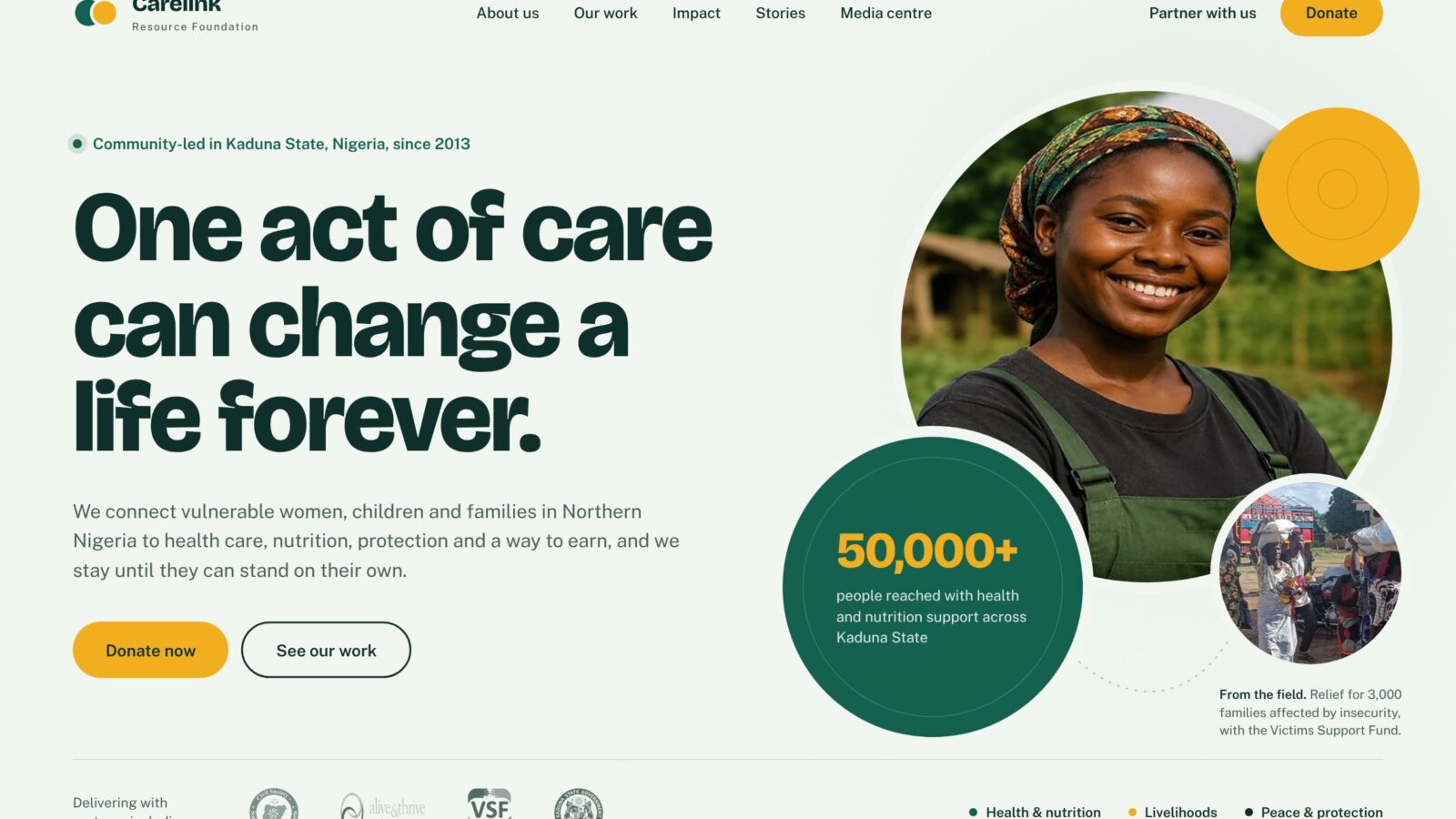
A redesign and Drupal rebuild for a community-driven NGO in Kaduna State, giving donors, partners and communities a clear picture of its work, shipped as a ready-to-install package.
- Client
- Carelink Resource Foundation
- Sector
- Nonprofit: health, nutrition, education, livelihoods, peacebuilding
- Role & scope
- Content audit, UX and information architecture, visual design, Drupal theme development
- Status
- Built and tested, not yet live
- Year
- 2026
Project overview
A redesign and Drupal rebuild for a community-driven NGO in Kaduna State, giving donors, partners and communities a clear picture of its work, shipped as a ready-to-install package.
Technologies used
Client & context
Carelink Resource Foundation is a community-driven NGO in Kaduna State, Nigeria. It has worked for more than a decade in health, nutrition, education, livelihoods and peacebuilding, with partners such as the Gates Foundation, the Global Fund and Save the Children.
Its website, carelinkrf.org, ran on Drupal 10 with a stock theme and a page builder. It had to speak to two audiences at once: funders checking credibility, and community members looking for help.
The problem
The live site undersold years of real work. A content audit found:
- Empty pages: six key pages, including Impact & Results, Get Involved and all four programme pages, showed only a partners strip.
- Broken links: Success Stories, Donate and Evidence of Prior Advocacy returned "page not found".
- No way to reach the organisation: no address, phone or email anywhere, and footer social icons that pointed to placeholder accounts.
- Inconsistent design: an early mockup used a different menu, footer and mobile behaviour on every page, and on some pages the menu vanished on phones.
Objectives
- Make every page in the menu lead somewhere useful, with no empty or broken pages.
- Show Carelink's reach and track record within the first scroll of the homepage.
- Give donors, partners and volunteers a clear next step from every page.
- Keep the site easy for non-technical staff to edit in Drupal.
- Deliver it as a package that installs on the existing site without a developer rebuilding content by hand.
Discovery & strategy
I crawled every page linked from the live site and catalogued what existed, what was empty and what was broken. The strongest material was buried: detailed projects, a five-person board and clear impact figures (10+ years, 50,000+ people reached).
The strategy was to rebuild with the content Carelink already had, not new marketing copy. Empty pages were written from the organisation's own text on its interventions, projects and partnership pages. Every page kept its existing web address, so links and search rankings carried over.
Design direction
The concept is interlocking circles: "links" between people, resources and communities. Overlapping circles form the logo mark, the homepage hero and the fallback artwork wherever a photo is missing.
- Colour: calm forest green (#14614F) and deep ink (#0E2F2A) as grounds, with a single marigold accent (#F2B01E) reserved for actions and key numbers.
- Type: Bricolage Grotesque for headlines, Public Sans for body text. Both are bundled with the theme, so no external font requests are made.
- Components: pill buttons, rounded cards, tag "chips" for focus areas, gold-ruled highlight blocks and a dark closing band that ends each page with a call to action.
User experience decisions
- One navigation everywhere: a single main menu, with the four programme pages grouped under Our Interventions, and a Donate button that is always visible.
- Homepage as a story: who we are, impact figures, programmes, stories of change, latest news, partners, then a clear ask.
- Tabs that degrade gracefully: the programme and story tabs are keyboard-accessible, and without JavaScript every panel simply shows in full.
- Mobile first in practice: a two-row header on desktop, a full-width menu on phones, and no sideways scrolling at 390px.
- Contact details editable in one place: address, phone, email and social links live in theme settings and stay hidden until filled in, so no placeholders ever show.
Development & implementation
The build has two parts, delivered as one zip file:
- A custom Drupal theme written from scratch with Twig templates, one stylesheet and a small script for the menu and tabs. It styles Drupal's own pieces too: menus, breadcrumbs, forms, the contact page and news listings.
- A one-click setup module. Enabling it installs the theme, creates or updates 15 pages, builds the menus and sets the homepage. Existing pages get a new revision rather than being overwritten, so old text can be restored.
Inner pages use the standard visual editor, so staff can keep editing them. I tested the full install on clean Drupal 11 sites and on a copy set up like the live site.
Outcomes
- All 15 pages, the Media Centre and the contact page load correctly after a one-click install.
- No sideways scrolling on any tested page at phone width (390px).
- Editing pages in the visual editor kept 100% of the layout styling across the four pages tested.
- The three broken links and six empty pages from the old site are replaced with complete pages.
None yet. These are the measures that will be reported after launch:
- Traffic to programme and impact pages
- Donations and partnership enquiries
Lessons learned
- Audit before you design. The biggest problems were missing content and broken links, not visuals.
- Design for the people who maintain the site. Choosing editor-friendly markup mattered as much as the look.
- Plan the handover. Drupal 11 removed the admin upload button, so the install guide had to cover cPanel and FTP clearly.
Planning something similar?
Tell me about your project and I will share how I would approach it.