

Body of Benchers website redesign
An audit, redesign and custom WordPress block theme for the statutory body that calls lawyers to the Nigerian Bar, with 387 office holders and the 2026/2027 calendar as records staff can edit without code.
- Client
- Body of Benchers, Nigeria
- Sector
- Legal education, public institution
- Role & scope
- Site audit, information architecture, visual design, WordPress theme development, content migration, accessibility testing
- Status
- Built and tested, awaiting launch
- Year
- 2026
Project overview
An audit, redesign and custom WordPress block theme for the statutory body that calls lawyers to the Nigerian Bar, with 387 office holders and the 2026/2027 calendar as records staff can edit without code.
Technologies used
Client & context
The Body of Benchers was established under the Legal Practitioners Act, 1962. Its website serves several audiences at once: aspiring lawyers checking Call to Bar notices, Benchers and judges, and members of the public looking for the right committee.
It publishes long official directories, including 53 past Chairmen, over 200 Life Benchers, Justices of the Supreme Court, and the Attorneys-General and Chief Judges of all 36 States. A small Secretariat team maintains the site, and none of them are developers.
The problem
The old site ran on a stack of page-builder plugins (Astra, Elementor Pro, Smart Slider). It looked dated, and it was hard to keep accurate. My audit found:
- Directories were long blocks of text. Visitors couldn't search them, and staff had to edit them line by line inside page layouts.
- Leftovers from the template were still public: demo pages such as "Services" and "Our Staff", a staging email address, and page addresses like /elementor-3413/.
- Some gallery photos and notices pointed to files that no longer existed on the server.
- Photos uploaded through the Benchers biodata form could be listed by anyone through the site's public API.
- Many page titles and menu items were set in capitals, which made long names of judges and committees hard to scan.
Objectives
- Give the Body a look that matches its standing: dignified, current and clearly Nigerian.
- Keep every existing page address so links in circulars, search results and bookmarks keep working.
- Turn the directories and the calendar into records staff can add to and correct in minutes.
- Make the site work well on phones and meet WCAG 2.1 AA accessibility checks.
- Close the security and housekeeping gaps the audit found.
Discovery & strategy
I started with an evidence-based audit of the live site: every page, menu, plugin, image and public endpoint. Then I mapped the content into three kinds:
- Pages that change rarely, such as About, the committees and Contact.
- Records that change often: Benchers and office holders, and calendar events.
- Publications: notices, speeches and tributes.
That split drove the strategy. Records became their own dashboard menus with simple forms, and the pages that display them build their lists automatically. I prototyped the full design first as a static site with all 53 pages, at their real addresses, so the client could click through and react before any WordPress work began.
Design direction
The direction is ceremonial, but not stuffy. It draws on the Call to Bar itself: the crest, the gown and the courtroom.
- Colour: deep purple (#3A1F5D) and gold (#C9A13B) from the crest, on a soft off-white background, with a near-black purple for dark sections.
- Type: Libre Caslon for headings and quotations, which has the feel of a printed statute, paired with Instrument Sans for menus, forms and data.
- Motifs: a double gold stripe taken from the facing of a barrister's gown marks portraits, cards and the footer. A custom icon set (scales, gavel, pillars) labels functions and committees.
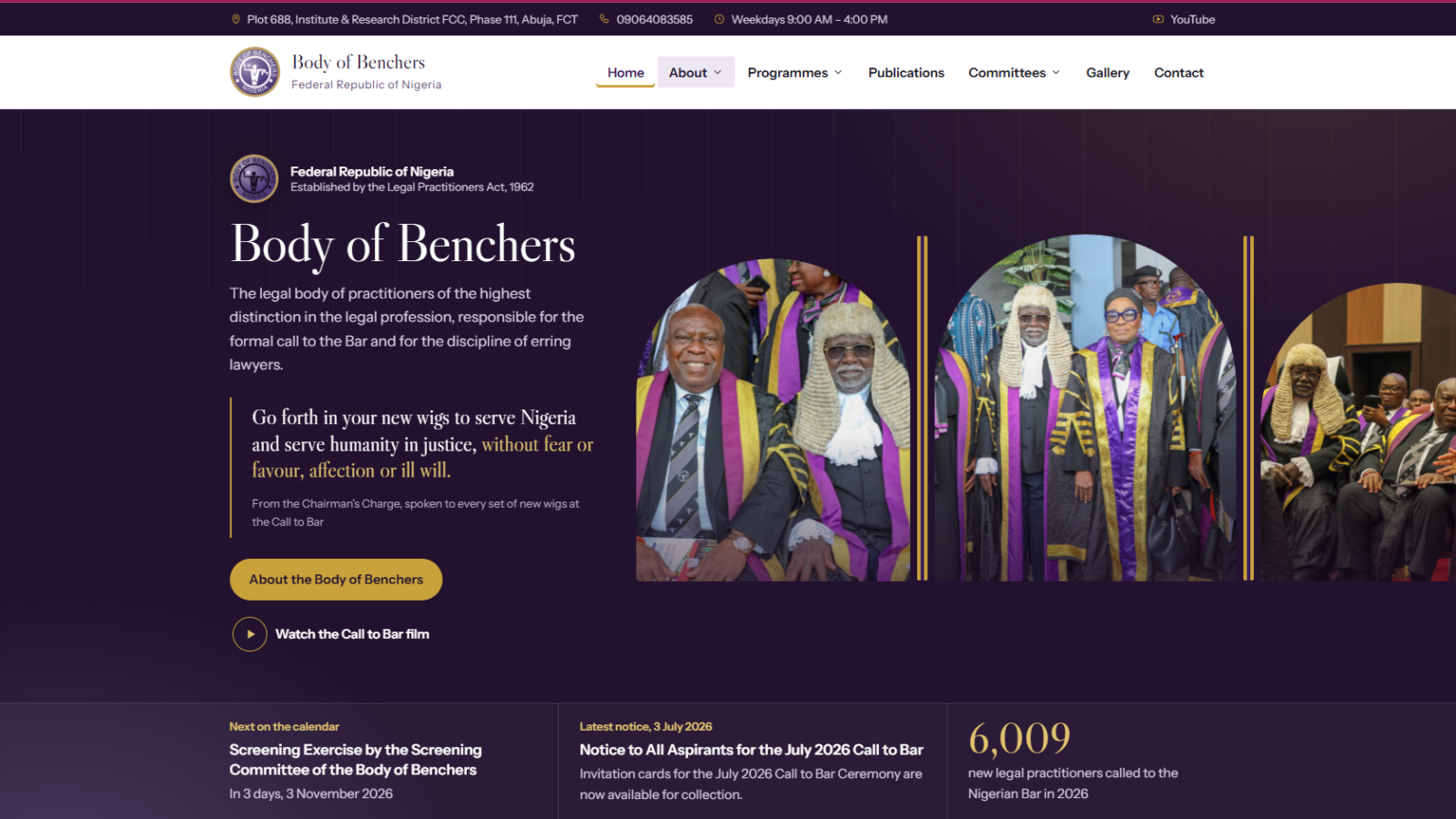
- The hero: three tall arched panels, like courtroom windows, slowly cycle through Call to Bar photographs. Beside them, the Chairman's Charge ("Go forth in your new wigs…") appears phrase by phrase. A live strip underneath shows the next calendar event, the latest notice and the year's Call to Bar figure.
User experience decisions
- Searchable directories. Every list of people has a search box with a live count. Chief Judges are grouped by State and can be filtered by geopolitical zone.
- A calendar people can use. The 2026/2027 programme appears as a month grid and as a list. "Coming up" on the home page drops past events by itself, and coloured labels separate ceremonies, meetings, screenings and holidays.
- Findable publications. Notices and speeches can be searched and filtered by category, so aspirants can find the latest Call to Bar notice quickly.
- Clear wayfinding. Each page has breadcrumbs. Committee pages share a side menu of all 17 committees, and every committee shows its officers before its members.
- Readable names. Titles use normal capitalisation instead of capitals, and long membership lists fold into categories.
- Calm motion and a usable phone layout. The hero has a pause control. On phones the menu opens as a full-screen list grouped by section.
- Forgiving forms. The contact form explains errors next to each field and moves focus to the first one. Spam is filtered without a CAPTCHA.
Development & implementation
The prototype was a static site generated from structured content files. The production build is a custom WordPress block theme, so the client can install it from the dashboard without touching code or the hosting file manager.
- Built for editing. Pages use WordPress's standard editor, with named styles such as "Notice box" and "Timeline". Fourteen custom blocks draw the directories, calendar, events, committee lists, statistics and the hero, and staff change their settings in a side panel.
- Records, not pages. "Benchers" and "Calendar events" have their own dashboard menus, with photo, office, State, zone and date fields.
- One-click migration. A setup screen writes the new design into the existing pages in place, so addresses don't change. It adds 387 office holders and 32 calendar entries, builds the menu and moves the demo pages to drafts. It keeps each page's old Elementor version behind a "Restore" button.
- Self-sufficient media. A batch tool copies about 165 original photos into the site's own Media Library and links Benchers to their portraits.
- Hardening. I hid the user list and the biodata photos from the public API, turned off XML-RPC and added security headers. The contact form is rate-limited.
- Testing. Automated browser tests crawled every page on desktop and mobile and opened all 52 pages and posts in the editor to confirm no block was invalid. Accessibility scans (axe-core, WCAG 2.1 AA) came back clean on the key templates. I also wrote a plain-language editing guide for the Secretariat.
Outcomes
- All 36 pages and 16 publications, kept at their original addresses.
- 387 office holders and the 2026/2027 calendar as records staff can edit, with no code.
- Installation in two steps from the WordPress dashboard, with a one-click way back to the old pages.
- No invalid blocks across 52 pages and posts, and clean WCAG 2.1 AA scans on the templates tested.
- Known security gaps closed, and broken or missing images found and fixed or removed.
None yet. These are the measures that will be reported after launch:
- How long staff take to post a notice or update an office holder
- Visits to the calendar and directories
- Contact form enquiries
Lessons learned
- Design the editing, not just the pages. For a small team, the most important screen is the dashboard. Turning directories into records did more for long-term accuracy than any visual change.
- Never break a link. Keeping every address, including awkward ones like /elementor-3413/, made the migration safe and reversible.
- Test on a copy that behaves like the real thing. The first staging install showed no photos because they only existed on the live server. Building a photo-copy step made the theme work on any copy of the site, not just production.
- Audit the content as well as the code. Several "broken design" problems turned out to be missing files on the server, and the fix was in the content, not the CSS.
Planning something similar?
Tell me about your project and I will share how I would approach it.